NEWS | SOFTWARE | SHEET
Learn about the key Components of the Excel-based Quantity Take-off Software
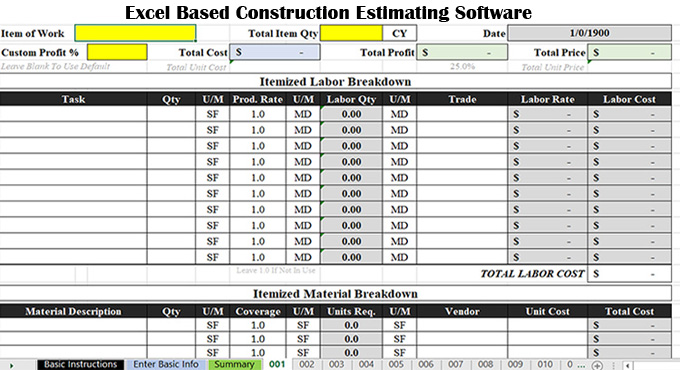
The use of the Excel-based estimating software is one of the easiest ways to calculate the construction costs, while the contractor needs to complete the construction period within a short frame of time. Several pre-designed Excel-based quantity take-off and estimating software have been used by some companies. There are numerous free construction estimation template has been available, which help to collect the data that the user gets when researching the overall costs of the construction project.
These quantity take-off templates help to anticipate the overall expenses of the project, thus ensuring the successful moving forward of that project. The Excel-based quantity take-off software helps to provide the most accurate estimates, thus helping to achieve better profit margins for the project owners and general building contractors.
Components of the Excel-based Quantity Take-off Software
Material costs
The Excel-based estimating software includes the costs of the raw materials that are required to build the overall construction structure.
Labour costs
The Excel-based quantity take-off software also includes the costs that have been associated with the human resources required for the construction project.
Direct costs
The Excel-based estimating software also includes the direct costs of the construction project, which are directly related to the project activity. The direct costs of the construction projects include the cost of the construction materials that have been used in the construction process, the cost of the labourers who are employed in the project and also the costs of the equipment that are either bought or rented for that construction project.
Indirect costs
The Excel-based quantity take-off software also includes indirect costs of the project, which are not allocated for the specific construction activities, for example, the security costs, the quality control costs, the admin costs or the temporary structure costs.
What are the key digital take-off tools used for achieving better construction work?
Viewport tools
This tool helps to take measurements from detail sheets easily, and this can be done by creating multiple scaled viewports in a single drawing.
Advanced measurement tools
The advanced measurement tools of the quantity take-off software help to measure depth, radius, volume, wall area, arc or angles in the construction project.
Quantity link tool
The quantity link tool helps to link measurement totals from multiple PDFs to Excel worksheets, which helps to get automatic bid calculations.
Markups list tool
This tool helps to track all markups in an integrated and customisable list for improving accountability and helps to create PDF, CSV, and XML reports accurately.
Dynamic fill tool
This tool helps to fill the complex drawing regions, which helps to generate measurements, markups and spaces.
Legends tool
The legend tools help to create a visual summary of the markup data on the PDF, which makes updates automatically as the changes are made.
Visual search tool
The visual search tool has been used to search symbols within the PDFs, and this tool helps to add hyperlinks or highlights and can also apply custom counts to the search results.
Profiles tool
This tool helps to store the preferred toolbars, tool sets and also helps to display the settings in a custom interface profile or can select from the preloaded profiles.
Studio session tool
This tool helps to invite anyone in the office to digitally mark up and measure, thus helping to measure them together at the same time.
Discuss the key advantages of using the Excel-based estimating software in the construction project
Improve project efficiency
The Excel-based estimating software helps automate repetitive takeoff tasks and also helps to export the quantity data to Excel, which helps to get cost estimating faster.
Maintain precision in the construction project
The Excel-based estimating software also helps to measure the areas, lengths, volumes and material quantities more accurately, along with its customizable digital takeoff tools.
Improve project collaboration
The Excel-based estimating software also helps to share the marked-up PDFs and the quantity take-offs along with the project team members in real time.
Implore project flexibility
The Excel-based estimating software helps to offer the customise measurement tools and take-off workflows, which help to match the specific project and the trade requirements.
Enhanced project visualisation
The Excel-based estimating software also helps to offer colour-coding, or label and helps to organise the digital take-offs to get clearer quantity tracking.
Learn about the popular quantity take-off and estimating software
BidScreen XL
The BidScreen XL software can handle quantity take-offs in Excel. This Excel-based estimating software has been installed as an add-in, a new ribbon tab on the Excel sheet. The BidScreen XL software involves counting symbols, tracing polylines, cross-section cuts or snapping to vector edges.
Bluebeam
Bluebeam is another popular estimating software, with an intuitive interface, which helps to ensure the accurate conduct of the quantity calculations and complex digital take-offs, thus helping to provide a competitive edge in the bidding and cost estimation process. With the help of the Bluebeam software, the solid earth civil contractors can triple their bid submission abilities. The Bluebeam software also enables civil engineering firms to enhance the take-off speed and accuracy.